Best Spanish Text to Speech Tools in 2026: Free & Natural
Need a Spanish voiceover but don't want to record yourself, hire a voice actor, or spend hours registering for tools that turn out to be useless? You're not alone. Spanish TTS has become the go-to solution for content creators, educators, and businesses — but the market is flooded with tools that overpromise and underdeliver.
Most reviews tell you which tools exist. This one tells you which ones are actually worth your time — and which ones waste it.
Who Uses Spanish Text to Speech?
Spanish TTS tools are used across a wide range of workflows:
- Content creators generating voiceovers for YouTube videos, Reels, and TikToks without recording
- Educators and course creators are converting written lessons into audio for Spanish-speaking learners
- Marketing teams producing Spanish ad voiceovers and product demos at scale
- Podcasters creating Spanish narration without a recording setup
If any of these describe your situation, the tools below are worth your time.
Best Spanish Text to Speech Tools in 2026
AI Dubbing — Best Free Spanish TTS with No Sign-Up
Best for: Anyone who needs a Spanish voiceover immediately, without friction.
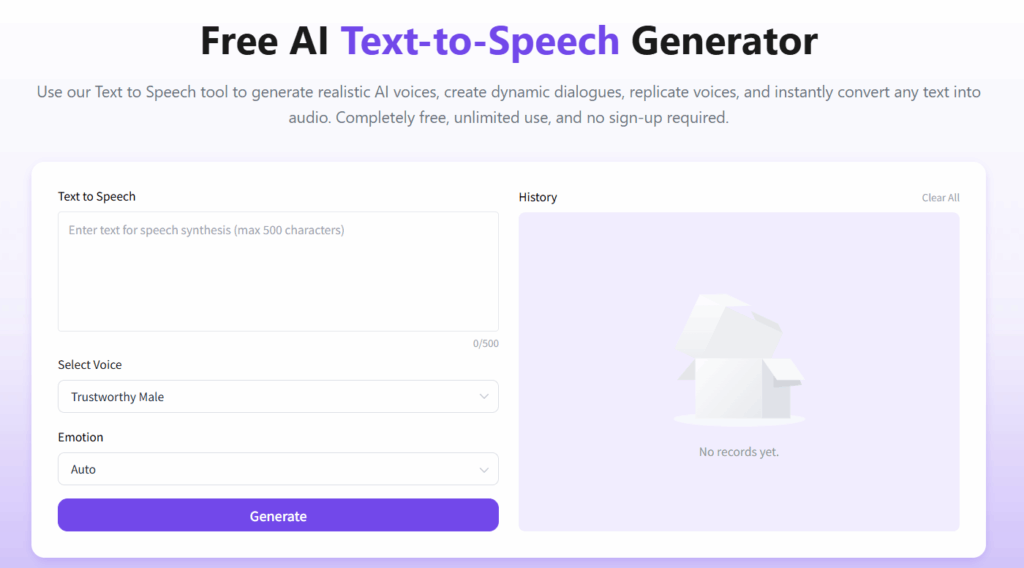
AI Dubbing takes the most direct approach of any tool on this list: no account, no registration form, no credit card. You open the page, paste your Spanish text, choose a voice, select an emotion, and generate. The entire process takes under a minute.
Emotion control is the standout feature for a free tool. You can choose from seven moods — neutral, happy, sad, angry, fearful, disgusted, and surprised — which means your voiceover can actually match the tone of your content rather than sounding like a generic automated voice. Voice options cover multiple genders and ages.
What to know before you use it:
- 500-character limit per generation — enough for short scripts and social media content, limiting for longer projects
- No dialect distinction between Mexican Spanish and Castilian Spanish
- No inline pause markers, though line breaks in your text create natural rhythm breaks
- MP3 download only
- Text input only, no file upload
For short-form content, quick turnarounds, and anyone who refuses to hand over their email address to try a tool, AI Dubbing is the most frictionless option available.
👉 Free Spanish text to speech — no sign-up required
ElevenLabs — Best Voice Quality
Best for: Creators who prioritize audio realism.
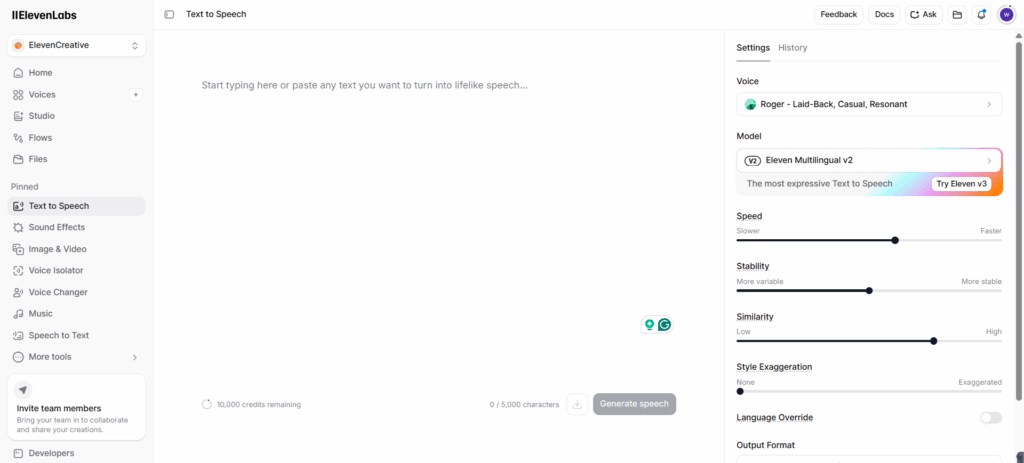
ElevenLabs’s Spanish text to speech is widely regarded as one of the most natural-sounding options in this list. The difference is noticeable — Spanish output features smooth intonation, natural rhythm, and realistic speech flow that many simpler text-to-speech models often struggle to achieve.
The free tier gives you 10,000 credits per month with access to text-to-speech, sound effects, voice design, and music. The 5,000-character input limit is generous compared to most competitors. You can adjust speed, stability, similarity, and style exaggeration — useful controls for fine-tuning output without paying.
What to know before you use it:
- Registration required, with a detailed onboarding form asking about your profession and how you found the tool
- No emotion/mood selector — tone comes from voice selection and parameter adjustment instead
- MP3 downloads on the free tier; WAV requires a paid plan
- Text input only, no file upload on the free tier
- Paid plans start at $6/month, scaling to $11 and $99
The registration friction is real, but a one-time cost. If voice quality is your primary concern and you're comfortable creating an account, ElevenLabs free tier delivers more than most paid tools.
Murf AI — Best for Fine-Tuned Voice Control
Best for: Users who need precise control over how their Spanish voiceover sounds and feels.
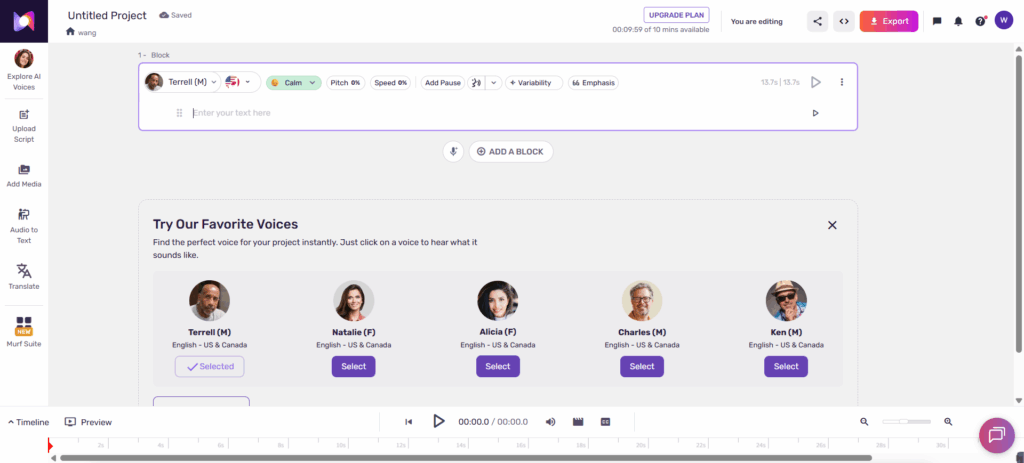
Murf's Spanish text to speech gives you more control over output than any other free tool here. Inline pause markers let you insert specific gaps — 0.25s, 0.5s, 0.75s — directly into your script, so the rhythm of your voiceover matches your content rather than sounding like an unbroken stream of words. Volume adjustment and file upload support round out a feature set built for users who treat voiceover as a craft, not just a checkbox.
Dialect support covers Spanish — Mexico and Spanish — Spain, which handles the two most commonly needed variants for most projects.
The interface is more complex than the other Spanish text to speech tools here — it's built for a studio-style workflow, which means a steeper learning curve if you just need something quick.
What to know before you use it:
- 1,000-character input limit
- Free tier includes 10 minutes of voice generation
- 3 emotion options: Conversational, Promo, Calm
- File upload supported
- Sign-up required
Narakeet — Best for Audio Precision and Regional Accents
Best for: Creators who need to control audio output specs and target specific Spanish-speaking regions.
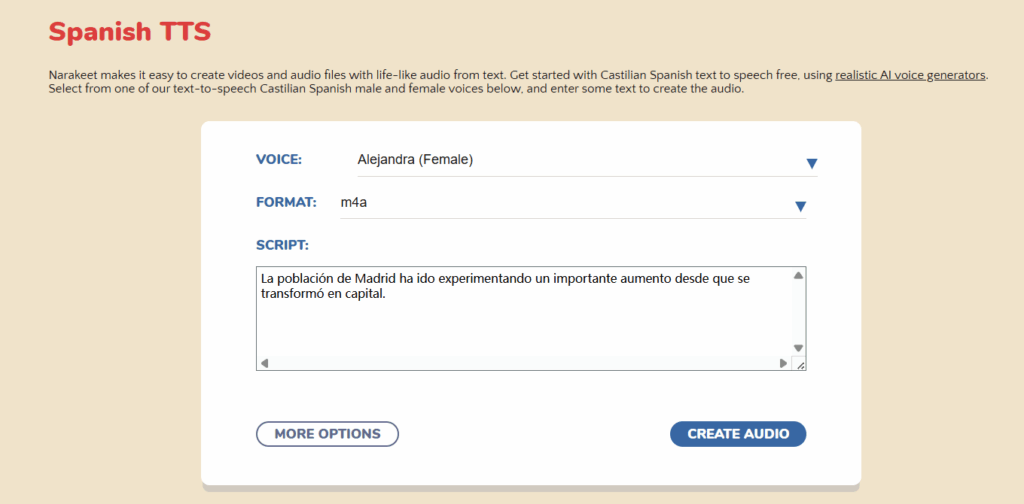
Two features set Narakeet apart. First, it shows you the estimated audio duration before you generate — a small detail that makes a real difference when you're building content to a specific runtime and need to know if your script runs long before committing to generation. Second, it supports EBU R128 volume normalization alongside standard soft, standard, and loud options — useful if your content needs to meet broadcast or platform audio standards.
Accent coverage is the strongest of any Spanish text to speech tool here at the free tier: Castilian, American, Mexican, and Puerto Rican Spanish are all available.
The background music option exists but offers so few choices it adds little practical value — ignore it entirely.
What to know before you use it:
- Free tier limits to 1KB narration, roughly one minute of audio
- Paid plan is $6 for 30 minutes — pay-as-you-go, not subscription
- Volume control and speed adjustment available
- File upload supported
- Sign-up required
LOVO AI — Best for Maximum Dialect Coverage
Best for: Professional teams with a budget who need to target multiple specific Latin American markets.
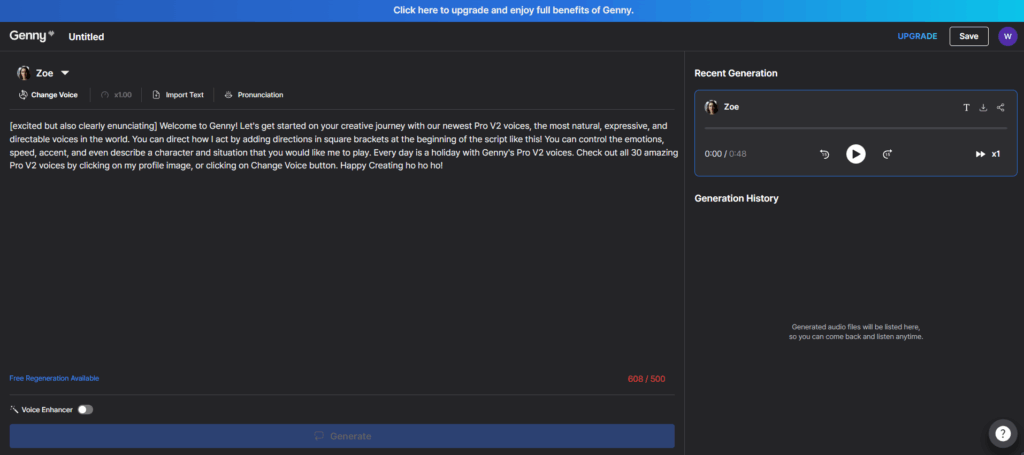
No other Spanish text to speech tool on this list comes close to LOVO's Spanish dialect range: Mexico, Nicaragua, Panama, Peru, Puerto Rico, Paraguay, El Salvador, United States Spanish, Uruguay, and Venezuela are all available as distinct voice options. If your work requires matching a very specific Spanish-speaking audience, this coverage is genuinely unmatched.
There is one critical limitation that needs to be stated clearly: the free tier lets you generate audio but not download it. You can preview output, but exporting requires a paid subscription. At $24 per month, it's the highest entry price on this list.
What to know before you use it:
- Free tier is preview only — no downloads without paying
- $24/month minimum for downloads
- 500-character input limit
- File upload supported
- Voice Enhancer requires paid plan
- Sign-up required
Side-by-Side Comparison
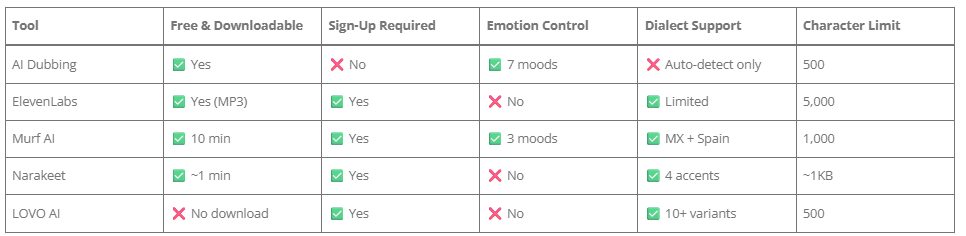
For most video creators — especially those just getting started or working at volume — the combination of zero cost, no registration, emotion control, and commercial use rights makes AI Dubbing the practical first choice. The other Spanish text to speech tools on this list are strong in specific areas, but they all require either payment or account creation to unlock full functionality.
Which Spanish Text to Speech Tool Should You Choose?
Spanish text to speech tools have made it easier than ever to generate natural-sounding Spanish voiceovers for videos, ads, education, and content creation.
The best choice depends on your needs:
- If you want the fastest and simplest Spanish TTS experience, AI Dubbing is ideal for instant voice generation without sign-up or setup.
- If you need the highest voice quality, ElevenLabs delivers the most natural-sounding Spanish AI voices.
- If you need regional Spanish accuracy, tools like Murf or Narakeet offer better control over dialects such as Mexican Spanish and Castilian Spanish.
- If you need enterprise-level Spanish voice generation, LOVO AI provides the widest range of regional Spanish accents.
Ultimately, the best Spanish text to speech tool is the one that matches your workflow — whether that’s speed, quality, or dialect precision.
If you’re just getting started, a simple, no-sign-up Spanish TTS tool is often the fastest way to turn text into high-quality voiceovers in seconds.
👉 Try a free Spanish text to speech tool and generate your first voiceover instantly.