Video Localization: How to Translate & Dub Video with AI
- Video Localization vs. Translation: What's the Difference?
- Video Localization Meaning: What It Actually Includes
- Why Should You Localize Your Video Content?
- Traditional Localization vs. AI Video Localization
- How to Localize a Video with AI — Step by Step
- Frequently Asked Questions About Video Localization
You've spent hours making a video. But 75% of the world can't understand it. That's where video localization comes in. Video localization is the process of adapting a video for a new language and culture, so it feels like it was made for that audience — not just translated for them.
It goes beyond swapping words. A truly localized video matches the language, tone, cultural references, and audio delivery of the target market. The result? Viewers don't feel like they're watching a foreign video. They feel like you made it for them.
If you're a YouTube creator, online course instructor, ecommerce seller, or small business owner with video content, localization is the fastest way to reach audiences you're currently invisible to.
Video Localization vs. Translation: What's the Difference?
People use these terms interchangeably, but they're not the same thing.
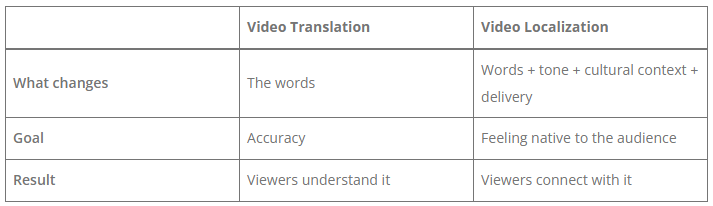
Translation asks: "What does this say?" Localization asks: "How would a native speaker actually say this?"
For example, a translated video might render a joke word-for-word into Spanish. A localized video rewrites it so it's actually funny in Spanish.
Video Localization Meaning: What It Actually Includes
When you localize a video, you're typically working with four elements:
Subtitle translation
Your spoken content gets translated and displayed as text, timed to match the audio. This is the minimum viable localization — and for many platforms (TikTok, Instagram Reels, LinkedIn), it's enough to dramatically increase reach.
AI dubbing
The original audio track is replaced with a new one in the target language, using AI-generated voices that sound natural and human. No hiring voice actors. No studio time.
Lip sync
The new audio is matched to the speaker's mouth movements in the video, so it doesn't look awkwardly dubbed. Modern AI lip sync is good enough that most viewers won't notice the difference.
Voice cloning
Some tools let you keep your own voice — just translated. Instead of a generic AI voice, the dubbed version sounds like you speaking Spanish, French, or Japanese.
AI video localization tools handle all four of these in one place — and it's free to try, no sign-up required.
Why Should You Localize Your Video Content?
Here's the reality: over 75% of the world's internet users are non-English speakers. If your videos are English-only, you're only visible to a fraction of your potential audience.
That's not a small problem. It's a massive opportunity hiding in plain sight.
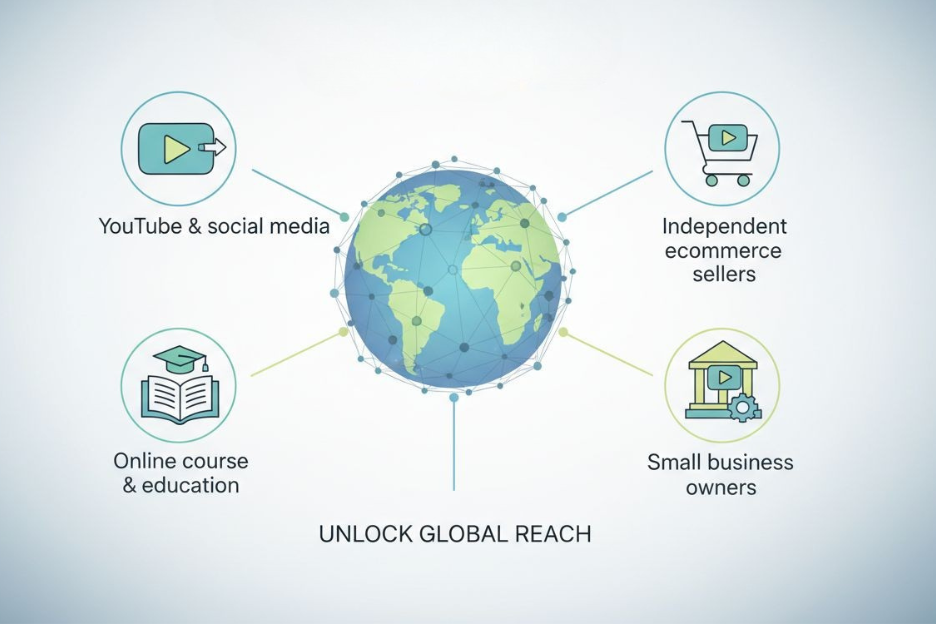
Here's what it looks like in practice for different types of creators:
YouTube & social media creators
You spend hours producing a video. It gets 10,000 views in English. The same video localized into Spanish reaches an additional 500 million native speakers — many of whom are actively searching for your exact content. One video, multiplied.
Online course & education creators
Completion rates go up when students learn in their native language. Adding localized subtitles or a dubbed audio track isn't just about reach — it directly improves your course outcomes and reviews.
Independent ecommerce sellers
A product demo video in the buyer's language removes friction at the most critical moment: the purchase decision. Shoppers are significantly more likely to buy when they can hear product information in their own language.
Small business owners
You can't afford to reshoot your product or brand videos for every market. Localization means one video does the work of many — without rebuilding anything from scratch.
The bottom line: localizing your video content is how you turn one piece of work into a global asset.
Traditional Localization vs. AI Video Localization
For most creators and small businesses, traditional video localization was never really an option. Here's why:
The traditional way:
- Hire a translator for the script
- Find a voice actor who speaks the target language
- Book studio recording time
- Send to post-production to sync audio
- Wait 1–2 weeks, pay $500–$3,000+ per video per language
That process makes sense for Netflix. It doesn't make sense for a YouTuber with 50,000 subscribers or a small business with a product demo video.
The AI way:
- Upload your video
- Select your target language
- Let AI handle transcription, translation, dubbing, and lip sync
- Download your localized video in minutes
- Cost: free to low-cost
Is AI localization perfect? No. For high-stakes creative content where cultural nuance really matters — like a Super Bowl ad — you'd still want a human review layer. But for the vast majority of creator and small business content, AI localization is not just "good enough." It's genuinely good, and it's fast enough to actually use.
How to Localize a Video with AI — Step by Step
Here's how to localize a video using AI video localization in under 5 minutes:
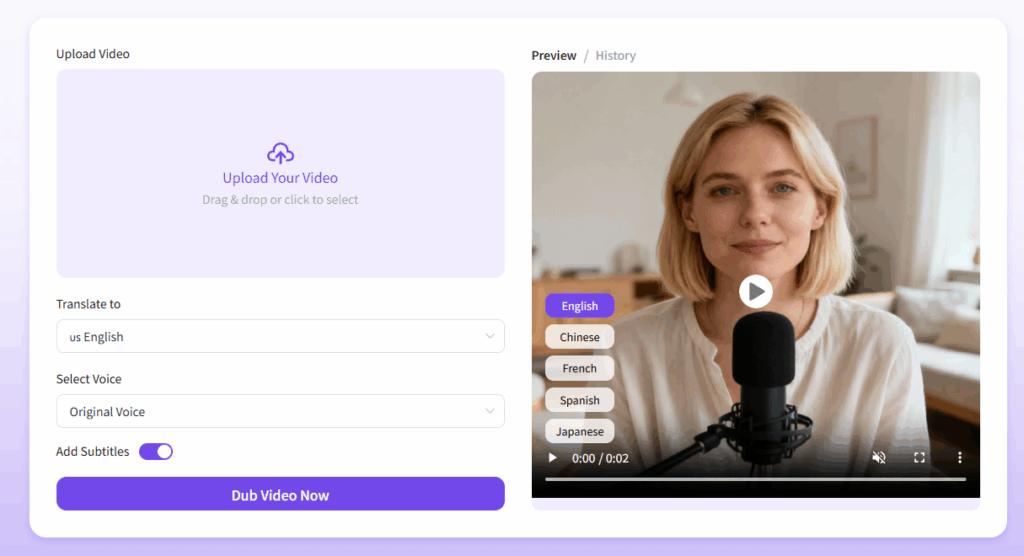
Step 1: Upload your video
Go to AI Video Localization and upload your MP4, MOV, or AVI file. The AI automatically detects the original language.
Step 2: Select your target language
Choose from 20+ supported languages, including Spanish, French, German, Japanese, Korean, Arabic, and Chinese.
Step 3: Choose your dubbing settings
Decide whether to keep your original voice (voice cloning), use a new AI voice, or enable lip sync. You can also toggle subtitles on or off.
Step 4: Generate and download
Click generate. Your localized video will be ready in the output panel. Download it and publish.
No account required. No credit card. No waiting.
Frequently Asked Questions About Video Localization
What is the difference between video localization and dubbing?
Dubbing specifically refers to replacing the original audio track with a new language recording. Video localization is the broader process — it includes dubbing, but also subtitle translation, lip sync, voice cloning, and cultural adaptation of the content itself.
Why should I localize my video content?
Because most of your potential audience doesn't speak English, over 75% of internet users are non-English speakers. Localizing your videos — even just adding subtitles — makes your content accessible to audiences who are actively searching for what you create, but currently can't engage with it.
How much does video localization cost?
With AI tools, it's free. Traditional professional localization (human translators + voice actors + post-production) typically costs $500–$3,000+ per video per language. AI has eliminated that cost barrier for creators and small businesses.
Can AI replace human translators for video localization?
For most creator and small business content — product demos, tutorials, social videos, online courses — AI localization is accurate and natural enough to use directly. For content where tone, humor, or cultural nuance is critical (brand films, emotional campaigns), adding a human review step is worthwhile.
Which languages does AI video localization support?
AI video localization supports 20+ languages, including English, Spanish, French, German, Japanese, Korean, Arabic, Chinese (Mandarin and Cantonese), Portuguese, and more.
How long does it take to localize a video with AI?
Most videos are processed in under 5 minutes. A 10-minute video typically takes 3–8 minutes, depending on file size and selected options.
Do I need any technical skills to localize a video with AI?
No. The process is upload → select language → generate → download. If you can use YouTube, you can use AI video localization.
You don't need a bigger budget. You don't need to reshoot anything. You don't need to hire translators or voice actors.
The videos you've already made are sitting there, invisible to 75% of the world — not because they're bad, but because they're only in one language.
That's the simplest problem in content creation to fix in 2026. Upload your video, pick a language, and let AI handle the rest. Most creators are surprised by how natural the output sounds — and how quickly their international views start moving. Ready to reach a global audience with your existing videos? Try AI Video Localization free — no sign-up needed →