
Step 1 — Upload Your Video File
Start by uploading your file directly into the video to text converter interface. Drag and drop your MP4, MOV, WebM, or other supported formats.
Upload Your Video. Get Text. No Installation Required.
Video to Text Converter uses advanced speech recognition and natural language processing for reliable results.
Your transcripts will appear here
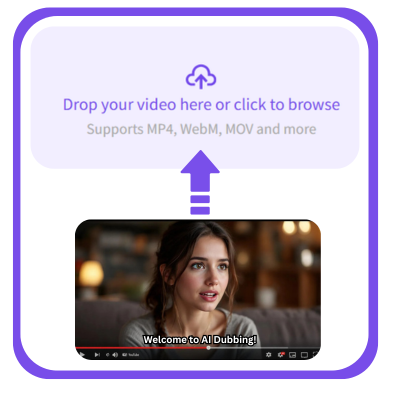
Start by uploading your file directly into the video to text converter interface. Drag and drop your MP4, MOV, WebM, or other supported formats.
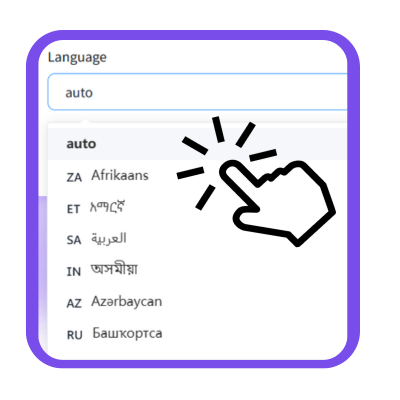
Choose the language for transcript.Our AI video to text pipeline handles multilingual speech patterns, producing video to transcript files in 60+ languages
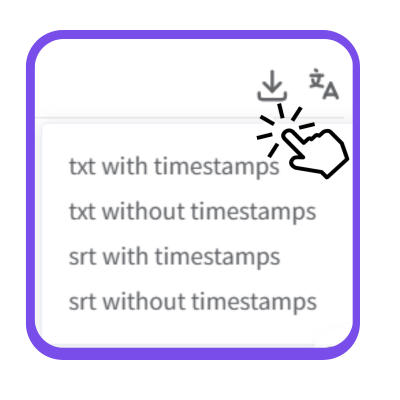
Once the video to text conversion is complete, review your result and export in TXT, SRT, VTT.The Video to Text Converter ensures your output is ready for captions, notes, or publishing.

“As an investigative journalist, I rely heavily on accurate transcripts from interviews and field recordings. This video to text converter handles background noise better than most paid tools I’ve tried, and the resulting video to transcript files are clean enough to quote directly in my reports.”

“As a university lecturer teaching international students, I constantly convert recorded lectures into multilingual notes. This video to text converter accuracy is exceptional. The video to transcript output saves me hours every week, especially when preparing structured materials for diverse classrooms.”

“In legal work, precision matters. I use this video to text converter to transcribe depositions, client interviews, and evidence footage. The video to text converter preserves timecodes clearly, making it easy to reference key statements, and ensures transcripts remain accurate across complex legal recordings.”

“I repurpose long videos into blog posts, social captions, and email scripts. This video to text converter has changed the way I work. Upload a file, and within minutes I get a my text.Among all the video to text converter platforms out there, this one consistently delivers the most accurate results.”

“As an agile coach, I record sprint reviews, team retros, and training workshops. The video to text converter helps me convert these recordings into actionable documentation for distributed teams. The video to text converter extracts not just transcripts but also clear segments aligned with discussion topics.”

“I conduct usability tests and user interviews weekly. This video to text converter drastically cuts down my analysis time. The video to text converter identifies spoken patterns clearly, turning raw recordings into structured video to transcript documents that I can tag, search, and code for insights.”